Showing posts with label Craft Projects. Show all posts

Thursday, March 14, 2013

Glass Pebble Nightlight Tutorial

So I've had this pinned on Pinterest for a while and decided to tackle it.  Here is the Pinterest pic:

Shades of Safhire: Glass Bead Night Light
You can see that HERE, but when you click on the link, it takes you to a page with a ton of other pics and I couldn't find this one, so I don't know where the original post is from.

Here is my rendition of it:
Shades of Safhire: Glass Bead Night Light

I used a LOT of glass pebbles and 2/3 of them really were blue, but the blue didn't show up as well as I'd hoped when I lit it up.  There were also only 6 bigger dark blue pebbles.  It gets the job done, though :)  I hope to make another one using all dark blue pebbles of varying sizes with only a few clear ones in hopes of getting a more blue affect than this. I like it, I just would love a bluer one ;)


So lets get started:


So I was browsing around Big Lots for a nice glass bottle or something to use for this project when I came upon this beauty.  What makes it so nice is that it is actually a tea candle holder and the bottom is removable so you can change out the tea light.  I decided to go with this because it would save me from having to get a diamond drill bit to drill into the glass with.  I could just remove the bottom.  I also had a 20% off coupon. Score! :)
Shades of Safhire: Glass Bead Night Light 

In the same trip to Big Lots (and with the same 20% off coupon for the entire purchase), I also found the glass pebbles.  This bag of pebbles was $5, so I wound up paying $4 for it.  I picked up the Aleen's Glass and Bead Adhesive at Joann Fabric store (in the area where they sell all kinds of adhesives).  It's important to use glass adhesive and not hot glue because hot glue will just come apart in no time.  I can't tell you the number of craft things I've gotten as gifts that were gorgeous when I received them, but they were done with hot glue and in no time I was having to re-glue the items that were glued with that stuff. Glass needs to be glued with glass adhesive :)

Shades of Safhire: Glass Bead Night Light

The first thing I did was sort the different colored pebbles so I could vary them as I was applying them to the candle holder:

Shades of Safhire: Glass Bead Night Light

Then just start glueing the pebbles onto the glass in whatever arrangement you desire. One thing I found out is not to use TOO much glue or the pebble would slide all over the place.  The directions say "small amount" and I guess they know what they're talking about :)  Follow the directions on the glue as it tells you to apply the glue to both surfaces you plan on adhering together then wait a few minutes and then put them together and press and hold.  

This was the hardest part of the whole project.  The more pebbles you adhered, the heavier the project got and the pebbles would make each other slide all over the place.  For ME with the type of glass candle holder I used, what worked best was starting at the sides where the metal part goes down the sides of the "jar" (for lack of a better word).  I could glue the pebble on right next to the metal bar and the pebble rested against the metal bar.  Then work my way away from the metal bar gluing pebbles next to the one I'd just glued on as the metal bar kept the pebble from sliding any farther.  (I hope that makes sense lol).

Shades of Safhire: Glass Bead Night Light

Apply the pebbles to half the glass and after the pebbles seem like they have stopped trying to slide around, you can leave it laying on it's side for 24 hours while the glue hardens and cures.

(See...I actually have at least 2/3 of the surface covered with BLUE! You just can only see the DARK blue as being blue when it's lit up).  I wish I'd have realized this before they were all glued on. But like I said...I think I'll be tackling this again with mostly dark blue pebbles this time :)
Shades of Safhire: Glass Bead Night Light

When you have half the pebbles glued on and it has sat for 24 hours, roll it over onto the pebbled- side and do the other side and let that set for 24 hours as well.

If you don't have a glass container like I did that has an opening in the bottom, you'll have to drill a hole in the bottom of the side of the container big enough to fit your Christmas lights in.  I've never done that before, but from all I've read, you probably need a diamond bit for your drill to do that. I took the lazy way out lol

Instead of buying new lights, I just went into my Christmas stash and pulled out this box of lights that I'd never opened.  I'm a colored-lights kind of girl at Christmas, so I don't use many clear/white lights, so I'd never opened this box.  In fact, I'd bought this on clearance at a drug store not long before I'd gotten married intending to use it to decorate the church altar for the wedding, but we never got to it in the decorating process.


Here you can see the bottom of the container I was talking about.  The bottom just unscrews for the original intention of changing out the tea light.  It was pretty cool :) I thought I'd have to alter in in some way so it would still be able to screw back on and still hold the core without pinching it, but it screwed back on loosely and didn't pinch the cord at all. (Again...check out ALL THAT BLUE!...that didn't show up in the dark) :)

Shades of Safhire: Glass Bead Night Light

I just stuffed the lights in there and pulled the male end of the cord out the bottom.  I didn't put anything over the top as I thought it might already be a little hot and thought leaving the top open would keep it from getting overly hot.

Shades of Safhire: Glass Bead Night Light


And there you have it :) My new night light for our hallway between the bedrooms and bathrooms.
I look forward to my next trip to Big Lots to buy another glass candle holder and then go to Hobby Lobby where I've seen nice DARK blue pebbles hehe.  But that's for another post :)

One thing that attracted me to this project was the way the original picture showed the pebbles reflecting onto the wall around it.  Mine is reflecting some, but I think the dark blue might reflect better. (Ok, so you know by now that I LOVE blue! hehe)

Shades of Safhire: Glass Bead Night Light

Happy night light creating :)


Friday, January 11, 2013

Cutting Vinyl Text with Silhouette Cameo

So I got the Silhouette Cameo electronic cutting machine for Christmas.  There's been so much going on that I just got to unpack it the other day!

Anyway, I have this project I'm working on for a friend from church.  She brought me this window she wanted me to paint a lighthouse scene on (with glass paint which I'd never used before) with the words of the chorus to the gospel song, "The Lighthouse".  I was totally intimidated as I'd never painted on glass before. Ok...well never INTENTIONALLY painted on glass before :)  But I've been giving it my best shot.

After I got painting it, I knew there was no way I could paint the text on it with that thin (kind of watery) glass paint and have it look halfway decent, so I decided to paint the scene on the backside, and use my handy dandy new Cameo to cut the text out of black vinyl and attach it to the front of the window (which totally rocks because it casts a neat shadow onto the scene on the other side of the window glass!)

Anyhoo...I watch a few videos on how to use the Cameo and do a little research and I get busy unpacking the machine and getting it all set up.  That part was no problem. However, I'd never come across a video on how to cut text out of vinyl before so after a handful of rookie mistakes, I finally got it right and thought I'd post a tutorial here for other rookies so that maybe I can save them a few gray hairs that I got in the process :)  So here we go:

The first thing you need to do is create the text you want to use in the software (I have the designer edition so I hope all of this is the same in the standard edition).  Click on the text tool on the left (where I drew the red arrow below):


Don't choose a font that's really skinny or you'll just cause yourself some real headaches if you're still in the rookie phase, like me :)  This font is Ariel size 72. Now that I look at it, I realize I didn't use bold. That may have helped :)  Initially, I tried to copy and paste the text from a Word document into the Silhouette Studio software, but that didn't work (at least not for me...maybe there's a way to do it after I get more familiar, but I just typed it into the software all over again for the time being).

Next you want to change your settings and your blade depth so the blade cuts through the vinyl correctly. 

Next click on the "Page Tools Window" icon in the upper right hand corner.  It's the red square within a black square.  I circled it in red below:


Choose the width of your vinyl (I was using a sheet of 12 x 24, but only cutting within the 12 x 12 area, so I chose 12 x 12.

Then choose (and this is really important because it's where I screwed up the first time and was ready to pull my hair out because I couldn't figure out why my vinyl was sliding all over the place in the cutter!):  At the bottom is a "Cutting Mat" selection window.  Choose NONE.  (When you cut a full sheet of vinyl you won't use your cutting mat.  This I did learn from a video somewhere. If you have scraps, you can use those on the cutting mat later).  So...rookie mistake #1 for me corrected :)

Next click on the "SILHOUETTE CUT SETTINGS" icon in the upper right immediately to the left of the previous place you clicked.  This time it's a pencil you will click on. Again, I circled it in red below:


In the first window, scroll down and click on "Vinyl Silhouette Brand" (ok, I used Cricut brand, but only because I found it easily at Walmart while we were there shopping for groceries).  

For the cutting speed and thickness and blade setting, I referred to this chart I found on Pinterest:

And I discovered what they have listed there for vinyl is the same thing the Silhouette Cut Settings window said to use as well (I have to do things the hard way at times lol).  But it's a nice chart to keep on hand when you're trying to figure out settings for other mediums as well.  The pin linked to Classy Clutter but when I went there to try to find the actual link to share here, I couldn't find it.

Ok...back to cutting our vinyl text!

Make sure you have your blade set to 2 (and make sure you clamp the blade back down again unlike I did the first and second times!!) :)  Ugh :)

Once you have your settings adjusted and your vinyl loaded (WITHOUT THE MAT), you can click on the CUT button  on the bottom (where I...yep..you guessed it...circled it in red).

If you're still confused, check out Expressions Vinyl Blog for a little extra info (at least it helped me)

Once your vinyl is loaded correctly and your settings are adjusted, click that CUT button and let her rip (not literally, we hope!)

Once your cutting is done, unload your vinyl and you should see something similar to this:


Now here's what REALLY helped me and believe it or not, I didn't see a tutorial or read any info on it, but it just kind of dawned on me when I realized what this big roll of tape was that came with my vinyl kit  I got with my Cameo (and remembered reading something in passing in a Pinterest pin about using freezer paper for transfer tape.  TRANSFER TAPE...aha! So THAT's what that stuff is :)
  I forgot to take a picture of it, but mine looks like this picture which I borrowed from the web site of WM Plastics Inc. after doing a Google image search:


   You COULD just peel the letter off one letter at a time (like I did for the first few letters before realizing it's not as easy to line it up and get it to stick in just the right place as it seems), but just save yourself the frustration (and tons of time) and use the transfer tape method. 
  Here's what ya do:
  Cut off a piece of the transfer tape about the size of 2-3 words or so.  Lay the tape (sticky side down) over the text that's been cut in the vinyl. (See the picture below).  Press it down over the vinyl text really well so it picks up the letters that have been cut out (concentrating on the dots for the "i", etc.)  Then slowly pull the transfer tape away and you should have the black vinyl letters now "transferred" to the "transfer" tape (I'm such a clever girl..heh...)


You don't have to use the cutting mat with a big piece of vinyl because the vinyl is sticking to a backing already and the vinyl letters pull away from the backing which doesn't get cut.

You will be left with letters on the transfer tape like so:


Sorry the words are different. I was taking pictures along the way so I could share the information with a friend and some pictures turned out better than others as I was working and taking pictures at the same time...

Your letters are now on the transfer tape.  Pull out the project you want to apply the letters to (in my case a window I'd painted on the other side of).  Line up the text overtop the surface you want to apply it to and stick the transfer tape with the letters onto the surface (again, sticky side down):


At this point I realized what I will do next time IF I ever do a painted glass project with text again.  Do the lettering FIRST, so I can put a ruler on the other side of the glass in order to line the text up better.  Live and learn, right? :)  

I forgot to take a picture of this, but your vinyl should come with a flat stick (like a tongue depressor) or you may have a tool that comes with a cutting kit that has a flat end (mine is a pair of tweezers that has a flat rounded end on the other end).  Take that stick or tool and rub over the letters to ensure they stick to the surface you want them to remain on.  Once they're on well, slowly peel away the transfer tape leaving the vinyl letters on the surface (in my case, glass):


Do it slowly as you'll want to carefully make sure the vinyl letters don't peel away with the transfer tape.  What I found is that rounded edges stayed on pretty well, but skinny things (like the letter I above) tended to want to pull off. Oh..and the dot in the letter i will try to pull away about half the time, so make sure you watch out for that.  You'll be left with something like this:


Next you'll need to use a pair of tweezers or something sharp like that (I started out with my fingernail...not a good idea...it tended to wrinkle the text I wanted to leave on the window) and remove the center of letters like the A's and the D in the picture above.


Then move on to the next set of words until you're done.  Here's how mine turned out:


Not bad for my first project, I think.  Again, next time the letters go on FIRST so I can use a ruler or straight edge on the other side to apply the words a little more straight.

That's it :)  I'll share more info on the window I painted once it's done.  I have to do some touch up and then I have to paint the window frame itself next.  I know normally you'd probably want to paint the frame first and then put the vinyl letters on and THEN paint your scene on the other side of the glass, but I was waiting on my friend to get back to me on what color she wanted me to paint the frame and I decided to get busy with the rest of it while I waited to hear back from her.

I learned a lot from this project.  Happy lettering!


Sunday, December 30, 2012

Gifts I Made for Christmas Gifts

This is another reason I slowed way down on my blog. In the midst of all the crises that arose this December, I made most of the gifts I gave family this year.  Here are some of them:


 Remember the stained glass scarf I posted a while back? It was red and yellow?  Ok..there never WAS a red and yellow scarf. It was actually THIS blue and yellow scarf. I took the image into my graphics program and changed the blue to red so I could still post it but throw my niece off her gift :) She loves Michigan State football (to the peril of me, her aunt who is an Ohio State grad....) whose colors are blue and yellow; so had I posted the pic with it blue and yellow she would have known what her gift was going to be.

The gloves are texting gloves. The index finger and thumb have flaps you can unbutton and push the finger parts down to let you use your finger and thumb for texting. The hat has a brim I thought was more of my niece's taste than a normal pull-down hat.

My niece has two daughters, Alexis and Payton. I made them Mickey Mouse-ish sets as well:

Here is Payton's Mickey set.  It's the hat I posted a few months ago and another hat I thought would be better for winter (with ear flaps and ties). It has a scarf that matches her mommy's but it more narrow (she's not quite 3 years old yet) and I bought red mittens for $1 and I crocheted black Mickey heads and sewed those on.


Here she is wearing them (not feeling very well, I'm told so not happy):


Alexis is 10 years old, so hers is bigger:

I crocheted the same kind of scarf as her mom's only with 3 sections wide since she's only 10. I made a similar hat to her sister's with a Minnie bow that you can remove if you want to be more like Mickey instead.  Also I got her a set of ear muff headphones and I crocheted a cover for them that's removable so it matches the rest of her set.

And here she is wearing all but the scarf.  She seems to really like it (that's my niece on the right) I'd never made mittens before ever, so this is my first attempt at mittens:

Next is the set I made for my mom:


It's made from super soft yarn that's wonderful to feel, but sure was not easy to work with.  Mom has never been a normal hat person. She always chooses to wear headscarfs, so I winged it and made a "head scarf" from the yarn to match the scarf so it ties under her chin like the scarves do. It's a double layer triangle.  I hope she likes them


And I posted this already, but I'll add it here too so it accompanies the other things I made for Christmas gifts.  The Oswald and Friends toys I crocheted for my son for Christmas (He LOVES them):


The next are not crocheted, but sewn. My sister had told me she had gotten a new coat and was having someone make a scarf for her, so I knew I couldn't do the crocheted scarf set for her.  A while back she'd called me when she was upset and said she needed a pillow that said, "Don't Allow Your Wounds to Turn You Into a Person You Are Not" as a reminder to not let people get to her. I think she'd forgotten about it, but I didn't. I made it for her for Christmas (along with buying her a Bible carrying case):


And I made a pillow for my brother-in-law Jim.  You can't see it in this picture and I forgot to take a picture of it, but he seems to like it.  It's the logo from the National Guard unit he's been with for the past 40 years and is about to retire from in about 3 months.

That's my sister (his wife) and my son Evan in the picture with him. You don't see pictures of my brother-in-law smiling too often, so I guess that's a sign that he likes it :) Part of the smile is that below the logo of his National Guard unit, I have a picture of his grand daughter Payton wearing his military hat with her arms up in the air in glee :)


That's the majority of the gifts I made. As you can see...I was really busy. I crocheted a lot in the hospital visiting my husband, crocheted nearly everywhere I was :)


Friday, November 2, 2012

Snowman Heads and a Gingerbread Man

Today's project was to work on my snowman heads some more, but I also crocheted a gingerbread man while watching TV with my family.

Here's what I have done so far with the snowmen:
I was inspired by the post over at The Idea Room HERE  After doing the four I have cut out already, I realize I need to make the faces longer so the mouth is up higher.  But here's what I have for now:

This one is pretty much done. The hat is a little small because I used my son's sweater sleeve from when he was littler instead of an adult sweater sleeve. I think it gives him personality though :)

Shades of Safhire - Fleece snowman head


This one just needs a hat yet. (I'll make that out of the fabric laying on the right folded up).
Shades of Safhire - Fleece snowman head (in process)

And last but not least, here's my little crocheted gingerbread man I made earlier.  He's about 9 inches tall or so and I got the pattern from HERE, but I made him with regular worsted yarn and not the No. 10 thread the pattern called for.

Shades of Safhire - crocheted gingerbread man

I probably won't be posting tomorrow (later today) as it's pay day and we have a lot to do, but who knows :)  I'm pretty much posting to myself it seems anyway :) (Getting followers is like pulling teeth it seems!!!)

Tuesday, October 30, 2012

Frankenstorm aka Sandy & My updated Craft Projects Page Galleries

I hope all my friends and family and blog readers on the east coast of the U.S. are safe and warm as I type this!  I live in north east Ohio and the wind is howling and battering against the window so hard I can't sleep. I can't imagine what those of you closer to the coast are going through...

Well I forgot to take a sleep aid to help me sleep through all the noise outside (till just a minute ago), but I did get a lot accomplished on my blog tonight as a result.  I added Linky Tools to my blog and now if you visit my Craft Projects page, I have galleries of my crafts there to check out, if you'd like.  They will be growing as time goes on, no doubt, and I'll be adding more galleries for other categories such as recipes and other holiday crafts and whatnot.

Click HERE to go to my Craft Projects page and see my work :)

Again...stay safe and you're in my prayers!!!


Friday, October 26, 2012

New Version of My Snowman Mug Hug

I had some time to kill in the waiting room of my husband's doctor's office today, so I took some yarn and supplies and made the majority of this new version of my snowman mug hug.  I made a different face and  I like this one much better than the first one I posted. It isn't the greatest picture (from my cell phone) and it isn't hooked onto a mug (like in the first picture of the first version), so the loops you see on the right are button loops (I have to sew the buttons on yet after I get some new white buttons for it).  I hope you like it!

(Inspired by the pattern HERE)

Snowman Mug Hug -version 2


Monday, October 22, 2012

Glass Pebble Chore Chart

As I posted in my last post, I'm seeking to find BALANCE in what I NEED to get done and what I WANT to do :) (Aren't we all?) :)  My current effort was found on Pinterest.  I made this chore chart using glass pebbles glued on magnets with a chore printed and glued in between the two.  I made a "to do" and "done" column for both my husband and I and put all the glass pebbles in a bowl and had him draw out half of them and those are his chores for the week and mine are the rest. Some of them are things that are hard work, some are very easy and simple, but need to be remembered too.  Looking at this chart, however, I told my husband we would start with getting it done in two weeks and when everything has been at least once, we can move it back to one week so the things that have been overlooked for too long could be just gone over again and wouldn't take as long.

Idea from HERE

Shades of Safhire - Glass Pebble Magnet Chore Chart

Ok, it isn't as pretty as I wanted it to be, but it serves its purpose.  At first, I made a pretty graphic and had put clear contact paper over it and had that covering the surface of the cookie sheet. BUT when I put the glass pebble magnet on it, it wouldn't stay! It kept sliding off, so I knew it wouldn't work any way but to have the magnet directly on the cookie sheet.  Maybe it's the "non-stick" feature of the cookie sheet, but the only way to even get the trim and column heading to stick was hot glue.  Maybe one day I'll figure out how to pretty it up better, but for now, it works.  Getting my husband to do his chores however...may be a much bigger chore in itself :)

(For the record, I have several of my glass pebbles moved to the "DONE" column since I took this picture!) :)

Friday, October 12, 2012

Crafting the Past Few Days

I've been super busy this past few days crafting.  I made several more Christmas pillows and a crocheted Christmas stocking I put in my Etsy shop.

Here's the stocking I just finished:
Shades of Safhire -Crocheted Christmas Stocking with Holly and Ivy

I also crocheted the first of a set of Santa mug rugs (coasters).  I only have one made so far, so it won't go on Etsy till the others are done, but here is the picture of the first one:

Shades of Safhire -crocheted Santa mug rug (coaster)

I don't plan on doing a ton of Santa stuff, but this was a simple pattern and it only took me a few hours to do it.

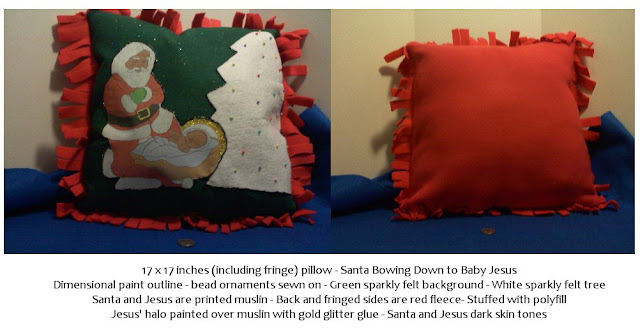
Here's a variety of Santa bowing down to baby Jesus pillows I made for Christmas and put in my Etsy shop (click to go to the correct page of my Etsy shop):


Shades of Safhire -Santa Bowing Down to Baby Jesus Christmas Pillow


Shades of Safhire -Santa Bowing Down to Baby Jesus Christmas Pillow

Shades of Safhire -Santa Bowing Down to Baby Jesus Christmas Pillow

Shades of Safhire -Santa Bowing Down to Baby Jesus Christmas Pillow

Shades of Safhire -Santa Bowing Down to Baby Jesus Christmas Pillow

Shades of Safhire -Santa Bowing Down to Baby Jesus Christmas Pillow

Shades of Safhire -Santa Bowing Down to Baby Jesus Christmas Pillow


I hope to move on to some new projects tomorrow, but it's nice to have several things in my Etsy shop finally :)

LinkWithin

Related Posts Plugin for WordPress, Blogger...
Find us on Google+